
Guide
Your payday routine is set up. Now comes the part that makes it all work: actually moving the money.
Each bucket in Wealthsplitter is a real bank account. If you built your routine with the setup wizard, this is already true: you picked your actual accounts. When it's time to move money, you don't have to think. You just transfer each bucket's amount to the account it belongs to.
Your buckets
Your accounts
Example setup. Your buckets and accounts will be different.
Missing an account you want in your routine? Most banks let you open a new savings account from their app in about two minutes. Name your buckets whatever your bank calls the accounts, and moving money is copy-paste easy.
This is the part where it all clicks. When you get paid:
That's it. The whole thing takes about four minutes. Do this every time income hits, and you'll build a clear picture of what you've moved into each account over time.
I've done this every payday for over two years. It works because there's nothing to figure out in the moment. Your routine already did the math.
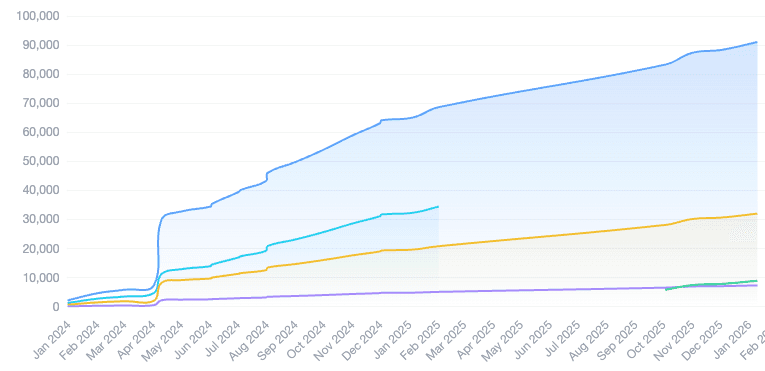
Actual user stats after 2+ years of using Wealthsplitter every payday.
The test for every bucket in your routine: does money actually go somewhere on payday? A transfer to your emergency fund or investment accounts counts. So does moving allowance into the kids' accounts. Move money on payday, you check it off, done.
Groceries are different. That money just sits in your checking account while you spend it through the week. It doesn't need its own bucket, because there's nothing to move on payday. Same for gas, coffee, and everything else you buy as you go. That's what the checking account bucket is for. The money's there when you need it.
Rent seems like an obvious bucket, but run the test: do you pay rent on payday? For most people it just waits in checking until the first of the month, so it's part of your checking amount, not its own bucket.
Start with the few moves you really make on payday. You can always adjust as you go.
Next time money lands, add it in Wealthsplitter and check off each transfer as you move it. Already split a paycheck? Head back and finish checking off the transfers. That's how your stats start adding up.
And you don't have to remember any of this. Set a payday reminder in the app and we'll email you when it's time, with your split ready to go.